
Game
Back to homepage JoJo: Golden Spirit
  Chasing Kaleidorider
  Star Savior
  Dragon Traveler
  Star Sailors
 Database
Characters Builds Arcana Arcana TierMeta
Character Tier List Arcana Tier List Wiki HomeTools
StarSaviordle Hot Team Builder Tier List Maker CommunityQuick links
Characters Tier List StarSaviordle Hot Codes CommunityGuide
Star Savior Codes (July 2026)
Updated July 19, 2026 — checked against current promotional drops. Copy an active code below, then redeem it in Account Management → Enter Coupon.
All active Star Savior codes
Tap Copy code, paste it in-game, and claim your rewards. Codes can expire or be one-time per account — if redemption fails, the code is likely used up or no longer valid.
Star Savior is a turn-based gacha RPG from Studio B Side where you captain star-powered Saviors through the Journey. Team building, synergies, and upgrades all eat into your resource pile — promo codes are an easy way to pick up free Stellagems, tickets, and other materials when they drop.
Below you will find the current working list, a short redeem guide with screenshots, common failure reasons, and older codes that no longer work. For builds and rankings, see our Star Savior tier list and wiki home.
How to redeem Star Savior codes
Coupon entry unlocks after the tutorial. The path is the same on most devices:
- Launch Star Savior and finish the tutorial if you have not already.
- Open the Menu (three lines, upper-right), then open Settings / Options.
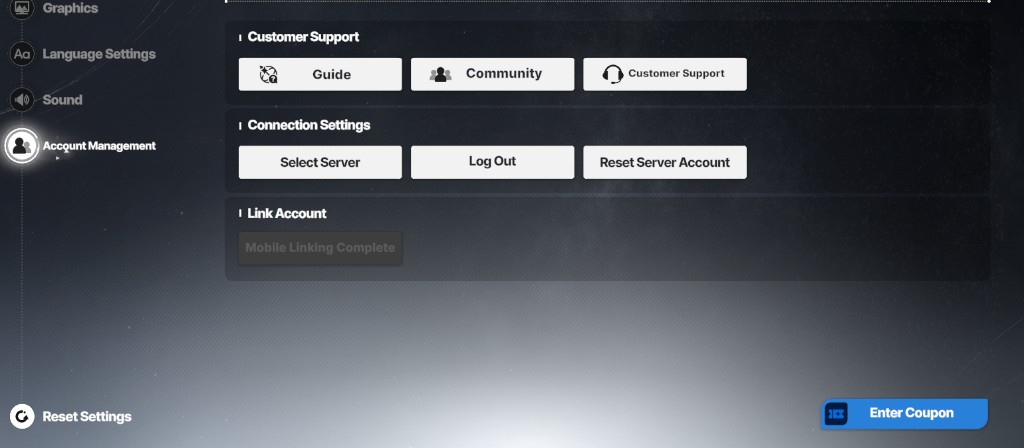
- Select the Account Management tab.
- Tap Enter Coupon on the lower-right of that screen.
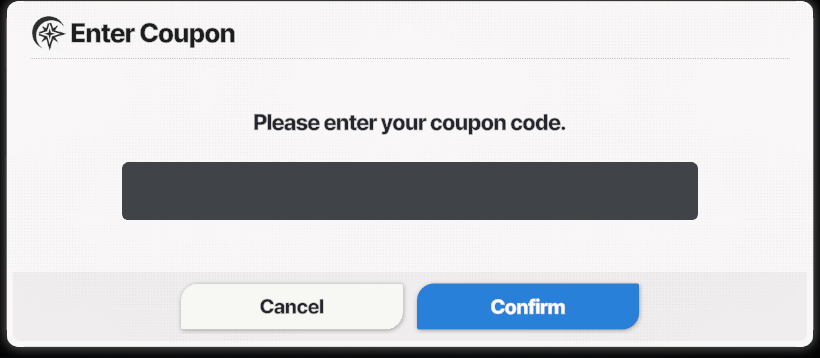
- Paste your code, tap Confirm, then check your mailbox if rewards do not appear instantly.
Account Management: use Enter Coupon (bottom-right).
Enter the code in the coupon dialog, then tap Confirm.
Why can't I redeem a code?
If a code fails, it is usually one of these:
- Expired — event and showcase codes often last only days or a few weeks.
- Already redeemed — most codes work once per account.
- Typos or extra spaces — enter the code exactly as shown; trim spaces after pasting.
- Tutorial not finished — coupon entry stays locked until the intro is done.
Expired Star Savior codes
These codes no longer grant rewards. They are listed so you do not waste time retrying old drops:
STARHALFANNIVSAVIOR26SHOWCASEHALFANNYCOMINGSOONSHOWCASE04WINDMOONSECT16DONOTENTERSTARSAVIOR251120HELLOSTARSAVIOR251127STARSAVIORSTARSAVIORHAPPY100DAYSMONASTIRVALENTINEDAY
Where to find more codes
Star Savior does not publish codes on a fixed schedule. Bookmark this page — we refresh the active list when new coupons are announced. You can also watch the official Discord and X accounts for first-party drops and community events.
Free codes help, but the long game is still team building and progression. When you are ready for the next step, browse our character guides and tier list on Tychara.